> For the complete documentation index, see [llms.txt](https://docs.portainer.ai/llms.txt). Markdown versions of documentation pages are available by appending `.md` to page URLs; this page is available as [Markdown](https://docs.portainer.ai/portainer-run/user/deploy.md).
# Deploy
Deploy is how applications get onto Kubernetes in Portainer-Run. Drop in the files Claude, Cursor, or any other AI coding tool generated, and Portainer-Run handles runtime detection, dependency installation, Git commit, and Kubernetes deployment automatically. No Dockerfile, no CI pipeline, no container registry, and no platform engineering ticket.
## Two ways to provide source
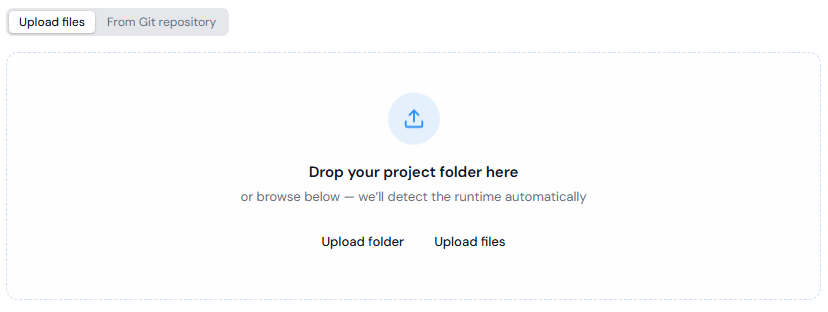
**File upload**: upload or drag in the files your AI tool produced. Portainer-Run commits those files to your configured Git target before deploying.
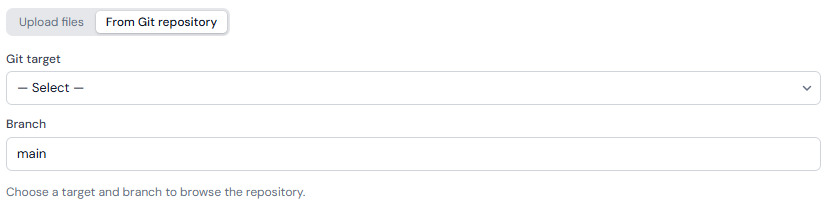
**Existing Git repository**: instead of uploading files, select a configured [Git target](https://docs.portainer.ai/portainer-run/user/admin/git-targets.md), branch, and optional subfolder. Portainer-Run fetches the file listing from that repository, detects the runtime, and clones directly from the source repository on every pod start. In this mode, no source files are additionally committed to the manifests repository; only the manifest itself is.
## Runtime detection
The runtime is detected from the file structure. Detection runs in priority order; the first match wins.
| Signal | Runtime |
| ---------------------------------------------------------- | --------------------- |
| `package.json` or `server.js` present | Node.js 22 |
| `requirements.txt` present, or any `.py` file | Python 3.13 |
| Any `.php` file | PHP 8.4 (Apache) |
| `Gemfile` present, or any `.rb` file | Ruby 3.4 |
| All files are static assets (HTML, CSS, JS, images, fonts) | nginx |
| No match | nginx (safe fallback) |
If your uploaded files include a `.env.example`, Portainer-Run detects it and presents an editable list of keys before deploying. Keys whose names look like secrets (for example those containing `PASSWORD`, `SECRET`, `TOKEN`, `API_KEY`, `PRIVATE_KEY` or `AUTH`) are masked in the form. Masking only affects how the value is displayed: every environment variable value is stored in a Kubernetes Secret (`-app-secrets`) rather than committed to Git, so the manifest in your repository never contains a value.
If the app is an nginx site and your upload contains exactly one HTML file and no `index.html`, Portainer-Run renames that file to `index.html` so nginx serves it at `/`.
## Size
Each application is given a T-shirt size, which sets its CPU and memory. **Small** is the default and fits most apps.
| Size | CPU requested / limit | Memory requested / limit |
| ------ | --------------------- | ------------------------ |
| Small | 0.1 / 1 | 1 GiB / 4 GiB |
| Medium | 0.2 / 2 | 2 GiB / 8 GiB |
| Large | 0.4 / 4 | 4 GiB / 16 GiB |
Choosing Medium or Large requires a reason, between 10 and 500 characters, explaining why the app needs more than Small. The reason is saved with the app in Git and shown to anyone who views it.
## What happens on deploy
Up to four init containers run in sequence before the application starts, each conditional on what's needed:
1. **vibe-web-guard**: present for PHP and nginx only. Configures the web server to refuse requests for dotfiles and dot directories (such as `.env` and `.git`), so they are never served from the web root. `/.well-known/` stays reachable.
2. **vibe-sync**: always present. Clones the source files from Git into a PersistentVolume. The repository's `.git` directory is removed from the application's directory after the clone.
3. **vibe-install**: present for Node.js, Python, Ruby, and PHP. Runs the runtime's dependency installer (`npm install`, `pip install`, `bundle install`, or `composer install`) against the PVC. Skipped entirely for nginx and static deployments.
4. **vibe-env**: always present. Writes a `.env` file to the PVC from the application's Kubernetes Secret, so the application works whether or not it uses a dotenv library itself. The values are also supplied to the application as environment variables. For nginx deployments no `.env` file is written, and any `.env` left by an earlier version is removed.
None of this requires a build step. Once the init containers finish, the main application container starts against the pre-populated PVC using a stock public runtime image, with resources set by the app's [size](#size). See [Applications](https://docs.portainer.ai/portainer-run/user/applications.md) for how to change the size afterward.
The manifest and (for file-upload deployments) the source files are committed to your Git target, and Portainer reconciles the change onto the cluster the same way it does for every deployment. See [Architecture](https://docs.portainer.ai/portainer-run/architecture/overview.md) for the full flow, and [Git Targets](https://docs.portainer.ai/portainer-run/user/admin/git-targets.md) for where things land in the repository.
## Updating a deployed app
Any update follows the same path as the initial deploy, and is also available directly from an application's **Edit** tab via **Upload updated files**: select a folder or files and click **Commit & Restart** to commit the change to Git and redeploy. If Portainer can't apply a saved change straight away, Portainer-Run tells you the change is saved in Git and that it applies the next time Portainer checks the app's stack for changes. Alternatively, push new commits to the source repository directly if you're using Git-source mode; Portainer's GitOps engine picks up the change on its next reconciliation pass. The PersistentVolume retains its state across pod restarts, so anything the application wrote to disk, including uploaded files and user data, persists through the update. See [Applications](https://docs.portainer.ai/portainer-run/user/applications.md) for the full Edit tab reference.
To pull a fresh runtime image, for example after a runtime security release, use **Redeploy** (see [Applications](https://docs.portainer.ai/portainer-run/user/applications.md#redeploy)). Administrators can redeploy many apps at once from [Runtime updates](https://docs.portainer.ai/portainer-run/user/admin/runtime-updates.md).
## Current limitations
* **Single-container only.** There's no support for multi-service architectures such as sidecars, databases, or message queues.
* **No compiled languages.** Go, Java, Rust, .NET, and anything else requiring a build step before running are out of scope. The init containers install runtime dependencies; they don't compile source code.
* **An Ingress controller is required** for Ingress exposure to actually work. Portainer-Run can create the Ingress resource regardless, but it doesn't install or configure a controller.
* **A default StorageClass is required.** Deploy creates a PVC for every application to hold source files and state. Without a default StorageClass, the PVC stays unbound and the application won't start.
### Deploying without the UI: MCP
Deploying from uploaded files is also available through Portainer-Run's [MCP endpoint](https://docs.portainer.ai/portainer-run/user/mcp.md), so an AI coding tool can deploy an application it just generated without a human ever opening Portainer-Run at all. Deploying from an existing Git repository is only available in the browser.