> For the complete documentation index, see [llms.txt](https://docs.portainer.ai/llms.txt). Markdown versions of documentation pages are available by appending `.md` to page URLs; this page is available as [Markdown](https://docs.portainer.ai/portainer-run/user/admin/git-targets.md).
# Git Targets
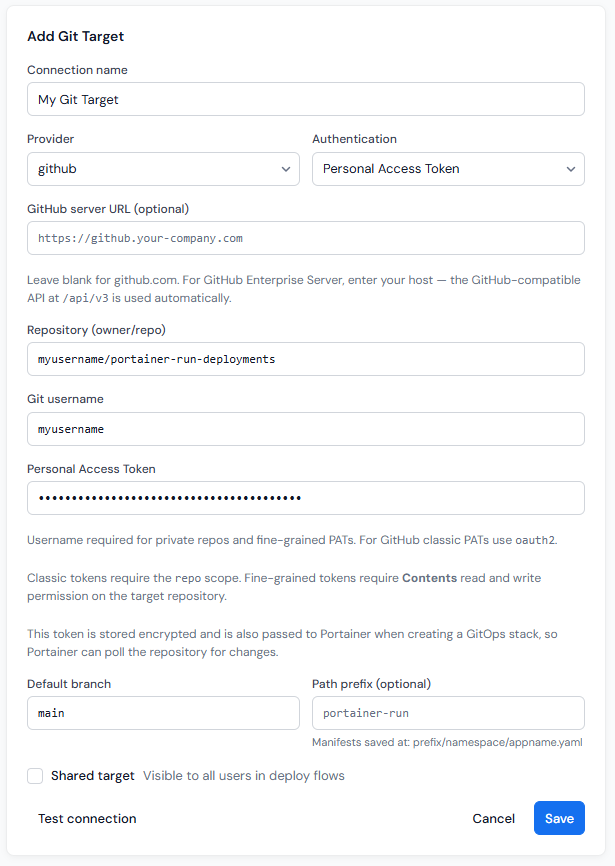
[Deploy](https://docs.portainer.ai/portainer-run/user/deploy.md) in Portainer-Run commits manifests and, for file uploads, source files, to a Git repository. A **Git target** is a stored, encrypted connection to one of those repositories.
## Personal vs. shared targets
Git targets are per-user by default: each user's targets are only visible to themselves. Administrators can additionally mark a target as **shared**, making it available to all users in every deploy flow while remaining read-only for non-admins. Non-admins can select and use a shared target, and run its Test check, but can't edit or delete it. Admins can edit and delete any target, including shared ones.
The Session section of the navigation shows the logged-in Portainer username, with an "admin" badge for admin users, so it's always clear whose targets are personal and who can manage shared ones.
## Configuring a target
Each target stores:
* **Provider**: GitHub, GitLab, Gitea, or Other, and an optional server URL.
* **Authentication** method - Personal Access Token or SSH Key.
* **Repository**, in `owner/repo` form.
* **Git username** and **Personal Access Token** or **SSH private key** (depending on your choice of **Authentication**), encrypted at rest using the encryption key provided during initial configuration. This key must remain identical across every Portainer-Run deploy, or stored targets become unreadable. See [Recovering targets after a key change](#recovering-targets-after-a-key-change).
* A **default branch**.
* An optional **path prefix**.
* **Skip TLS verification**, shown only when the target has a custom server URL. Leave it off unless the Git server's certificate is self-signed or from an internal CA. It is off by default. Your token crosses this connection, so an attacker on the network path could intercept it while this is on, and a certificate from a public CA, such as Let's Encrypt, is the safer choice. The setting applies to that target only: Portainer-Run's calls to the Git server, the clone of an app's source, and the stack Portainer uses to pull the manifests each follow the setting of the target they use. A stack created by an earlier release keeps skipping verification until you untick it in the stack's Git settings in Portainer, or delete and redeploy the app.
* Whether the GIt target is a **Shared target** (ie, available to other Portainer-Run users or just the user that created it).
### Token scopes
Provider
Requirement
GitHub (fine-grained PAT)
Contents (read and write) permission on the target repository.
GitHub (classic PAT)
repo scope.
GitLab / Gitea
An access token with equivalent read/write repository permissions.
### GitHub Enterprise Server
Keep the provider set to **GitHub** and enter your server host in the GitHub server URL field. Portainer-Run uses the GitHub-compatible REST API at `/api/v3` on that host. Don't use the **Other** provider for GitHub Enterprise; that path targets the Gitea API instead and won't work.
### Self-hosted GitLab
Keep the provider set to **GitLab** and enter your server host in the GitLab server URL field. Leave it blank for gitlab.com.
## Testing a target
The **Test** button on each target checks connectivity and reports read and write permissions. For GitHub, this uses the collaborator permissions API, which works correctly with fine-grained PATs.
### Recovering targets after a key change
Git targets deleted because of a key change are not lost. When you continue with a new key, Portainer-Run first copies each target it deletes into the `connections_orphaned` table in `data/portainer-run.db`. The same happens on the first start after upgrading from 1.3, if a key change had already been acknowledged.
To get the targets back, restore the key that encrypted them in Portainer, copy the rows back, and restart the pod:
```bash
kubectl exec -n -- node -e "const db = new (require('node:sqlite').DatabaseSync)('/app/data/portainer-run.db'); db.exec('INSERT OR IGNORE INTO connections SELECT id, name, type, encrypted_payload, owner_id, shared, created_at FROM connections_orphaned; DELETE FROM connections_orphaned WHERE id IN (SELECT id FROM connections)')"
```
Targets created under the key you just replaced will then show as unreadable. You can recover them the same way.
## Where things land in the repository
Regardless of which deploy path is used, Portainer-Run keeps a consistent structure so deployments across environments and namespaces stay cleanly separated within the same repository:
* Manifests: `///.yaml`
* Source files: `////src/`
The environment name is lowercased, with any run of characters other than letters or numbers replaced by `-`. The path prefix is the optional one set on the Git target.
## Deleting an application
When you delete an application and tick **Also remove from Git**, its directory is deleted from the repository in a single commit:
* **GitHub** uses the Git Data API tree approach, removing all files under a directory in one commit regardless of file count, matching what the GitHub UI's "Delete directory" button does.
* **GitLab** uses a batch delete via the commits API.
* **Gitea** implements the equivalent behavior.
## Next: Cluster Readiness
Git Targets sits alongside [Cluster Readiness](https://docs.portainer.ai/portainer-run/user/admin/cluster-readiness.md) in the Admin section. One governs where deployments are committed, and the other governs which environments can receive them at all.